
Map Traveler Mcp
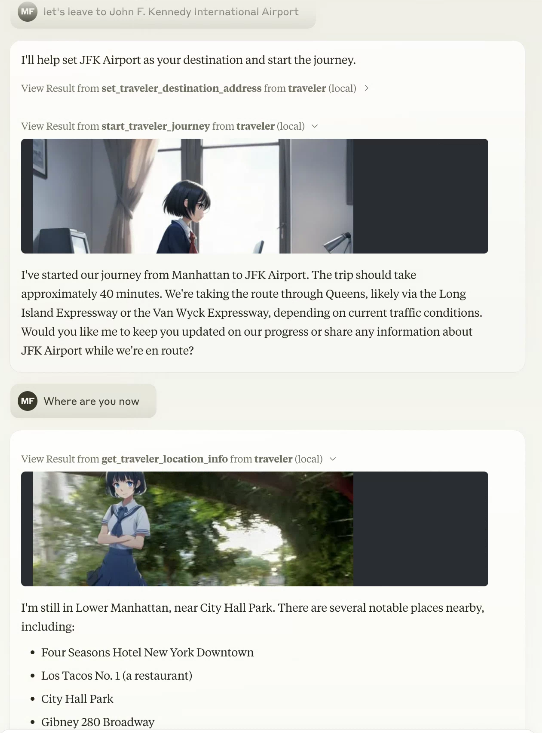
Turns Google Maps into a virtual travel environment where an AI avatar explores real locations and reports back with synthesized photos. You get MCP tools to set destinations, start journeys, query current location, and retrieve Street View imagery composited with character sprites. It hooks into Gemini or PixAI for image generation, supports both realtime movement and skip-to-percentage teleporting, and can even post trip updates to Bluesky if you wire up SNS credentials. Needs Google Maps API and an image generation key at minimum. The resource prompts let Claude act as the traveler itself, including a role where two instances play a geography challenge game over social media. Practical if you want location-aware storytelling or autonomous agents that navigate and document real-world routes.
- GitHub stars
- 23
- tools
- 8
- auth
- Secret needed
- transport
- STDIO
- env vars
- 24
- last updated
- Sep 11, 2025
Tools
8 toolsPublic tool metadata for what this MCP can expose to an agent.
get_traveler_view_infoGet the address of the current traveler's location and information on nearby facilities,view snapshot2 params
Get the address of the current traveler's location and information on nearby facilities,view snapshot
includeNearbyFacilitiesbooleanincludePhotobooleanget_traveler_locationGet the address of the current traveler's location
Get the address of the current traveler's location
No parameter schema in public metadata yet.
tipsInform you of recommended actions for your device
Inform you of recommended actions for your device
No parameter schema in public metadata yet.
get_settingGet current setting
Get current setting
No parameter schema in public metadata yet.
get_traveler_infoget a traveler's setting.For example, traveler's name, the language traveler speak, Personality and speaking habits, etc.1 params
get a traveler's setting.For example, traveler's name, the language traveler speak, Personality and speaking habits, etc.
settingsvalueset_traveler_infoset a traveler's setting.For example, traveler's name, the language traveler speak, Personality and speaking habits, etc.1 params
set a traveler's setting.For example, traveler's name, the language traveler speak, Personality and speaking habits, etc.
settingsstringstart_traveler_journeyStart the traveler's journey to destination
Start the traveler's journey to destination
No parameter schema in public metadata yet.
stop_traveler_journeyStop the traveler's journey
Stop the traveler's journey
No parameter schema in public metadata yet.
Sponsors
 Agent CaffeineSponsoredClose your lid, come back to finished work
 SnugSponsoredThe clipboard manager for the AI eraPromote your product hereReach 125k+ visitors monthly
 WaxSponsoredBlock anything with supervision, without erasing your iPhonePromote your product hereReach 125k+ visitors monthly
 knobsSponsoredSee your site on any phone, any day, in any language
Configuration
MT_GOOGLE_MAP_KEYsecret[Map] Google Map API key
MT_GEMINI_IMAGE_KEYsecret[Image.gemini] Gemini Image Api key
MT_MAX_RETRY_GEMINI[Image.gemini] Number of retries when generating Gemini images Default: 0
MT_AVATAR_IMAGE_URI[Image.gemini] Character reference image uri (file:// or https://) when generating Gemini image. Multiple settings can be made by separating them with the '|'. When multiple settings are made, they will be selected randomly.
MT_MAP_API_URL[Map.etc] Optional: Map API custom endpoint. Example: direction=https://xxxx,places=https://yyyy
MT_TIME_SCALE[Map] Optional:Scale of travel time on real roads duration. default 4
MT_SQLITE_PATH[db.local] db save path: e.g. %USERPROFILE%/Desktop/traveler.sqlite ,$HOME/traveler.sqlite
MT_TURSO_URL[db.api] Turso sqlite API URL
MT_TURSO_TOKENsecret[db.api] Turso sqlite API access token
MT_REMBG_PATH[rembg.local] absolute path of the installed rembg cli
MT_REMBG_URL[rembg.api] withoutbg.com rembg API URL
MT_REMBG_WO_KEYsecret[rembg.api] withoutbg.com rembg API key
MT_PIXAI_KEYsecret[Image.pixAi] pixAi API key
MT_SD_KEYsecret[Image.sd] Stability.ai image generation API key
MT_PIXAI_MODEL_ID[Image.pixAi] Optional: pixAi ModelId, if not set use default model 1648918127446573124
MT_COMFY_URL[Image.local.ComfyUi] Option: Generate image using ComfyUI API at specified URL. Example: http://192.168.1.100:8188
MT_COMFY_WORKFLOW_T2I[Image.local.ComfyUi] Optional: Path to API workflow file when using text to image with ComfyUI. If not specified: assets/comfy/t2i_sample.json
MT_COMFY_WORKFLOW_I2I[Image.local.ComfyUi] Optional: Path of API workflow file when image to image in ComfyUI. If not specified: assets/comfy/i2i_sample.json
MT_COMFY_PARAMS[Image.local.ComfyUi] Optional: Variable values to send to the workflow via comfyUI API
MT_FIXED_MODEL_PROMPT[Image] Optional: Fixed avatar generation prompt. You will no longer be able to change your avatar during conversations.
MT_BODY_AREA_RATIO[Image] Optional: Acceptable avatar image area ratio. default 0.042
MT_BODY_HW_RATIO[Image] Optional: Acceptable avatar image aspect ratios. default 1.5~2.3
MT_BODY_WINDOW_RATIO_W[Image] Optional: Avatar composite window horizontal ratio. default 0.5
MT_BODY_WINDOW_RATIO_H[Image] Optional: Avatar composite window aspect ratio. default 0.75
Readme
Virtual Traveling bot environment for MCP
We are currently developing a next-generation traveling bot system. It will take some time to complete, but in the meantime, please enjoy using this MCP server, which operates in MCP v1 mode.
English / Japanese
This is an MCP server that creates an environment for an avatar to virtually travel on Google Maps.
From an MCP client such as Claude Desktop, you can give instructions to the avatar and report on the progress of its journey with photos.
Preparing for MCP Registry Support https://blog.modelcontextprotocol.io/posts/2025-09-08-mcp-registry-preview/
Added gemini-2.5-flash-image-preview (nano-banana) to travel image generation
Support for nano-banana has been added. Nano-banana's semantic mask allows you to generate composite travel images in a short time without setting remBg.
Although conventional image synthesis is still possible, we recommend using Gemini nano-banana.
Supports both Streamable-HTTP and stdio (compliant with Smithery.ai's config interface)
Details
- Repository
- github.com/mfukushim/map-traveler-mcp
- Package
@mfukushim/map-traveler-mcp- Transport
- STDIO
- Auth
- Required
- Registry
- MCP registry, active