
Draw2agent
Bridges the gap between visual feedback and code changes by letting you draw annotations directly on your localhost dev page, then hands that context to your AI agent. Exposes four MCP tools: launch_canvas proxies your dev server with an Excalidraw overlay for on-page markup, launch_ipad_canvas does the same but serves a QR code so you can draw from a tablet on the same network, launch_scratch opens a blank whiteboard for UI mockups, and get_drawing_state retrieves the current screenshot plus DOM data. When you submit, your agent gets structured annotations alongside the rendered page. Reach for this when you want to circle a broken layout or sketch a design directly on the running app instead of describing it in text.
- GitHub stars
- 3
- tools
- 4
- transport
- STDIO
- last updated
- Mar 2, 2026
Tools
4 toolsPublic tool metadata for what this MCP can expose to an agent.
launch_canvasOpens your dev page with the drawing overlay
Opens your dev page with the drawing overlay
No parameter schema in public metadata yet.
launch_ipad_canvasServes the page on your LAN and returns a QR code for drawing from iPad/mobile
Serves the page on your LAN and returns a QR code for drawing from iPad/mobile
No parameter schema in public metadata yet.
launch_scratchOpens a standalone Excalidraw whiteboard for freehand sketching
Opens a standalone Excalidraw whiteboard for freehand sketching
No parameter schema in public metadata yet.
get_drawing_stateReturns screenshot, DOM nodes, and annotations for the current state
Returns screenshot, DOM nodes, and annotations for the current state
No parameter schema in public metadata yet.
Sponsors
 Agent CaffeineSponsoredClose your lid, come back to finished work
 SnugSponsoredThe clipboard manager for the AI eraPromote your product hereReach 125k+ visitors monthly
 WaxSponsoredBlock anything with supervision, without erasing your iPhonePromote your product hereReach 125k+ visitors monthly
 knobsSponsoredSee your site on any phone, any day, in any language
Readme
draw2agent ✏️


Draw on your website. Your AI agent sees it.
draw2agent is an MCP server that lets you draw annotations directly on top of your local dev page. When you submit, your IDE agent receives a screenshot, structured DOM data, and annotation context to make precise code edits.
👉 Try it out at: draw2agent.vercel.app
Demo
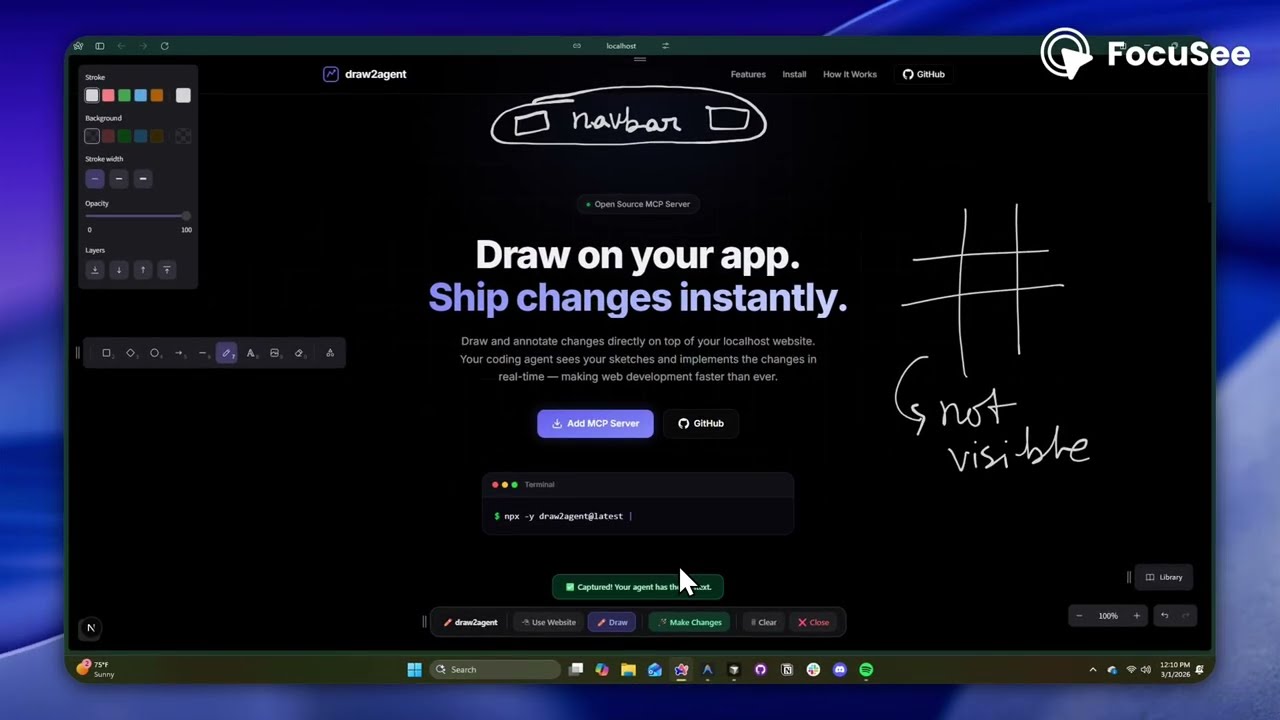
Quick Start
1. Add to your IDE (one-time)
Cursor (~/.cursor/mcp.json):
{
  "mcpServers": {
    "draw2agent": {
      "command": "npx",
      "args": ["-y", "draw2agent@latest"]
    }
  }
}
2. Use it
Tell your agent:
"Use draw2agent to fix the navbar"
Details
- Repository
- github.com/zero-abd/draw2agent
- Category
- AI & LLM Tools
- Package
draw2agent- Transport
- STDIO
- Registry
- MCP registry, active
More from zero-abd
Related AI & LLM Tools MCP servers
View all Mcpcueapi/cueapi-mcpSchedule agent work and report write-once outcomes via CueAPI from any MCP host.2stars
 Afterpathsburnssa/afterpathsSession memory for AI coding agents. Search past sessions, extract rules, and track what works.2stars
 Wisdomgraphcklam12345/wisdomgraphNeo4j-native DIKW memory for Claude Code — knowledge that compounds across sessions2stars
 LittleSis API Servercode-rabi/littlesis-mcpProvide access to the LittleSis API to track corporate power and accountability. Enable querying and exploring relationships and entities related to corporate i2stars
 Meertrackmeertrack/meertrack-mcpCompetitive intelligence - track what competitors ship each week. 8 tools, 3 prompt workflows.2stars
 Kit.com MCP Serverdancumberland/kit-mcpAgent-optimized MCP server for Kit.com email marketing. 13 composite tools, 100% V4 API.2stars